Merge Developers
Developers often commit from different Git accounts — work laptop vs. personal machine, old email vs. new email. Merge these identities together to get accurate statistics for each person.
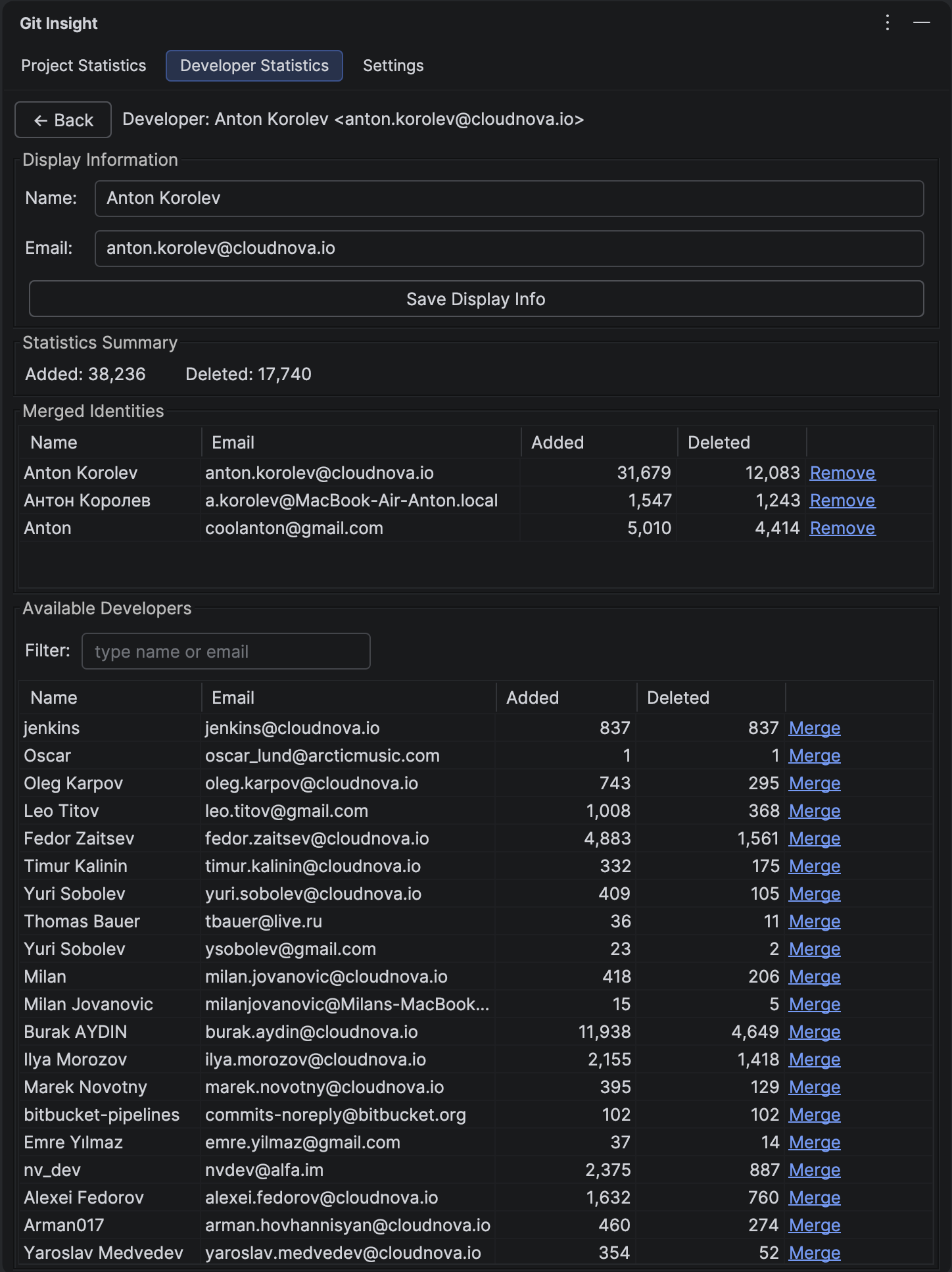
Key Features
- Combine multiple Git identities (name + email pairs) into one
- Set custom display name and email for the merged profile
- View aggregated statistics for all merged identities
- Search available developers to merge
- Remove identities from merged profile
Panel Sections
Display Information
Edit how this developer appears in statistics:
- Name — display name shown in tables and charts
- Email — display email shown in developer list
Click "Save" to apply your changes.
Statistics Summary
Shows combined totals for all merged identities:
- Lines added — sum from all identities
- Lines deleted — sum from all identities
Merged Identities Table
Lists all Git identities currently merged into this profile. Columns:
- Name — Git author name
- Email — Git author email
- Added — lines added by this identity
- Deleted — lines deleted by this identity
- Remove — click to unmerge (not available for primary identity)
Available Developers Table
Shows developers not yet merged with this profile. Use the search field to filter by name or email. Click "Merge" to add an identity to this profile.
How to Use
Open the Panel
From Developer Statistics, right-click a developer and select "Manage Developer".
Merge Identities
- Find the developer to merge in the "Available Developers" table
- Use search to filter if needed
- Click "Merge" in that row
- The identity moves to the "Merged Identities" table
- Statistics update immediately
Quick Merge
For faster merging, select multiple developers in the main Developer Statistics table, then right-click and choose "Merge to [Developer]".
Unmerge Identities
Click "Remove" next to any merged identity (except the primary one) to separate it back into its own developer entry.
Tip
Merge configurations are stored in your project's .idea/gitInsight.xml file. You can add this to version control so all team members share the same developer mappings.