Settings
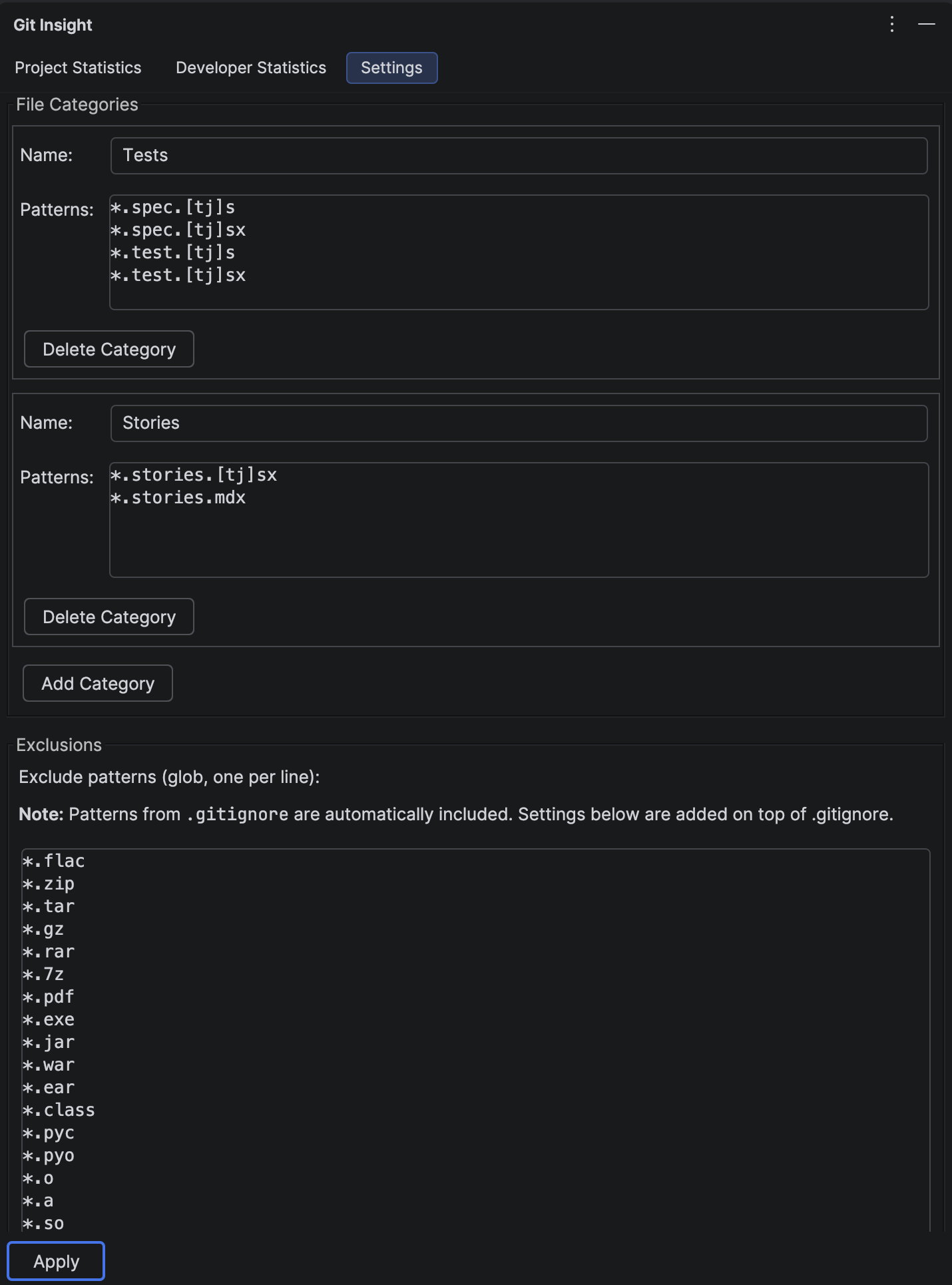
Customize how Git Insight analyzes your project. Define file categories for filtering, set exclusion patterns to ignore certain files, and configure size limits.
Key Features
- Define custom file categories with glob patterns
- Set exclusion patterns to ignore files from analysis
- Configure maximum file size limit
- Automatic .gitignore integration
- Settings stored in project for team sharing
File Categories
Categories let you group related file types for filtering in statistics panels. Each category has:
- Name — display name shown in filter checkboxes
- Patterns — glob patterns matching files in this category (one per line)
Example Categories
- Tests:
**/*Test.kt,**/*.spec.ts,**/test/** - TypeScript:
*.ts,*.tsx - Configuration:
*.json,*.yaml,*.yml
Managing Categories
- Add Category — creates a new empty category editor
- Delete Category — removes the category (button on each category)
Exclusion Patterns
Files matching these patterns are completely ignored in all statistics. Uses glob syntax:
*— matches any characters except path separator**— matches any number of directories?— matches exactly one character[abc]— matches one of specified characters
Default Exclusions
Git Insight excludes common directories by default:
.git/**,.idea/**build/**,out/**,target/**node_modules/**,vendor/**
.gitignore Integration
Files ignored by your project's .gitignore are automatically excluded. You don't need to duplicate these patterns in settings.
Max File Size
Files larger than this limit (in bytes) are skipped during analysis. Default is 10 MB (10485760 bytes). Increase this if you have large text files you want to analyze, or decrease to speed up scanning.
How to Use
Apply Changes
Click the "Apply" button to save all settings. Statistics refresh automatically after applying.
Validation
Settings are validated before applying:
- Category names must be unique and non-empty
- Each category must have at least one pattern
- Patterns must be valid glob syntax
- Max file size must be a positive number
Error messages show the specific issue and line number for invalid patterns.
Share with Team
Settings are stored in .idea/gitInsight.xml. Add this file to version control so all team members use the same configuration.
Tip
Create a "Generated" category with patterns like **/*.generated.* and **/generated/**. Then you can easily exclude auto-generated code from developer productivity comparisons.